
Tools
Signal Check, Repair Preview and Rule Builder
Check a sensor CSV online without sending it anywhere. Load your own export or our sample. Find the problems, repair what can be repaired safely, and turn your limits into rules.
Your file stays in your browser. It is read on your device and never uploaded. No account is needed.
Signal Check
Find gaps, spikes, flatlines and drift in a time series.
Every flag comes from a fixed rule with a default you can change. The methods are explained on How it works.
Load data
A CSV with a timestamp column and one or more numeric columns. Up to 5 MB or 50,000 rows. You can also drop a file here.
Sample data: an invented temperature and pressure series. Problems were added on purpose so you can see each check work.
Issues found
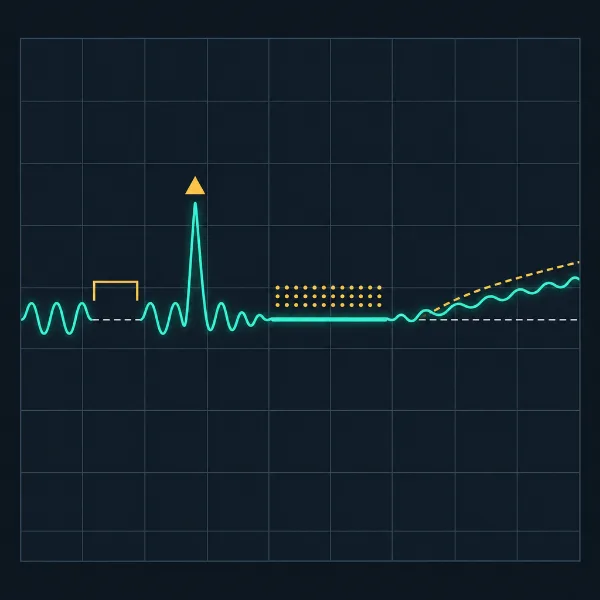
- Gap (shaded band, dashed edges)
- Spike or step (triangle and ring)
- Flatline (thick underline)
- Drift (hatched band)
Issues marked on the series. Select an issue in the list to zoom to it.
| Type | Column | Start | End | Detail |
|---|
Repair Preview
See each proposed fix before it changes anything. Nothing is applied until you accept it.
- Gaps: filled by linear interpolation between the readings on each side.
- Spikes: replaced with the rolling median.
- Optional: resample the whole series to a fixed interval.

Run Signal Check first. Proposed fixes for gaps and spikes appear here.
In each chart the original series is dashed and the repaired series is solid teal. Step flags are for review and are not changed.
Flatlines and drift are flagged for review, not auto-corrected. The right fix depends on the sensor: a stuck reading may need replacing with data from another source, and drift may need a calibration offset. Sigmend shows you where these sections are. The decision stays with you.
Resample
Pending
Downloads
You haven't accepted any changes yet. The repaired file would be the same as your original.
The change log lists every accepted change: time, column, original value, new value and method. Rejected changes are left out, and that data stays as it was. Both files are made in your browser.
Rule Builder
Turn a limit into a rule you can read, share and paste into code or config. The rule is built from a template as you fill in the form.
Rule output
Example to start with: “temperature_c must not change by more than 5 °C within 1 minute”. Press Build rule to see it as text, JSON and YAML.